


Your morning just got easier
We believe the first thing you see when you open the portal should help you, not overwhelm you. That's why we've completely redesigned the home page.
When you log in, you're now greeted with a morning briefing: a quick snapshot of what's ahead. How many callbacks are scheduled? What did your team accomplish yesterday? It's all right there, no clicking required.
Below the briefing, you'll find team statistics and a leaderboard. Not to create pressure, but to give your team a shared sense of progress. Who resolved the most callbacks this week? How does the team compare to last month? It's a small thing, but practices tell us it makes a real difference in morale.
And because every day deserves a good start, there's a daily health tip waiting for you too.
Talkwise results, now organized
If you use Talkwise, you'll notice something different right away. Results are no longer shown as one long page. Instead, everything is organized in tabs: the transcription in one, the SOAP report in another.
This might sound like a small change, but in practice it means you find what you need faster. Need to copy the transcription? One click. Want to review the report before adding it to the patient file? It's right there.
We've also made it possible to configure automatic processing per user. Some assistants prefer Talkwise to process calls automatically, others want to trigger it manually. Now, each team member can work the way that suits them best.
See who called before
When you open a task, there's a new panel on the side: the caller history. It shows previous interactions with the same caller, so you have context before you even pick up the phone.
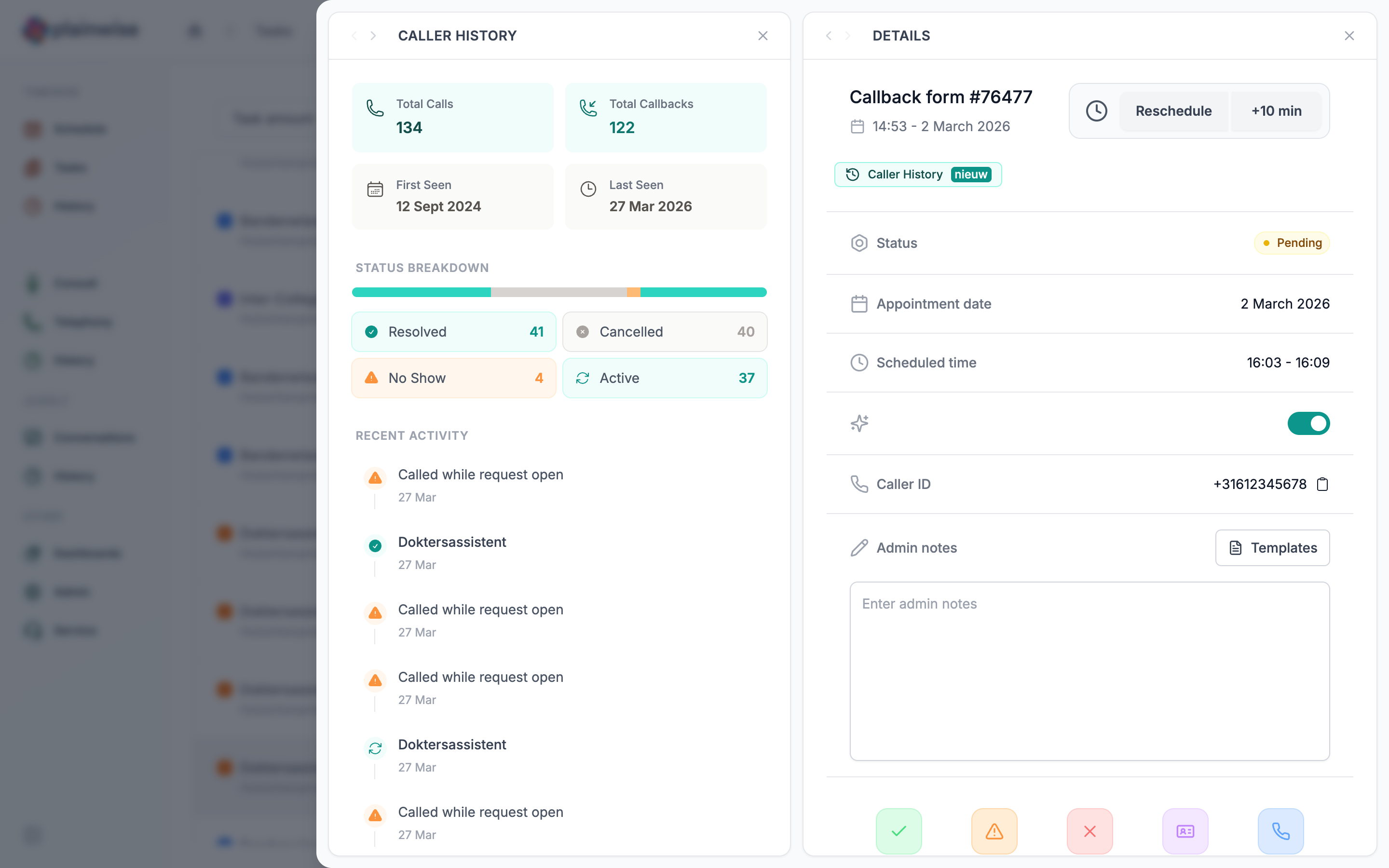
You can collapse and expand this panel whenever you need more space. It's designed to be there when you need it and out of the way when you don't.
One portal, multiple practices
For teams working across multiple locations, this one's for you. You can now open different practices in separate browser tabs. Each tab keeps its own context, so switching between tenants no longer means losing your place.
This was one of the most requested features from both assistants and resellers, and we're happy to finally deliver it.
A calmer dashboard
We've refined how your daily stats are presented. The dashboard now shows "completed this month" instead of "completed today", giving you a more meaningful picture of progress without the daily pressure.
There's also a new average handling time metric visible in the dashboard, so practice managers can spot trends and optimize scheduling.
Small changes, big impact
Beyond the headline features, we've made dozens of refinements that add up to a smoother experience:
- Filter callbacks by call flow to focus on what matters
- Collapsible alerts at the top of pages, so they don't take up space when you've read them
- Calendar row height is now adjustable in the options menu
- Recording cards have a cleaner, more modern design
- Page titles and spacing are more consistent across the portal
- Written contact form as a new alternative to phone-based contact
Want to see it in action?
The update is live for all Plainwise users. Log in to explore the new home page, or get in touch if you'd like a walkthrough of the latest features.
What's next
We're already working on the next round of improvements. Expect more intelligence in how the portal helps you prioritize your day, deeper Talkwise integrations, and new tools for practice managers to understand team performance.
As always, your feedback shapes what we build. Hit the feedback button in the portal or reach out to your Plainwise contact. We read everything.
This update is available now for all Plainwise users. No action needed, just log in and enjoy.


